 Instant Preview
Preview Links in Chrome Without Leaving the Page
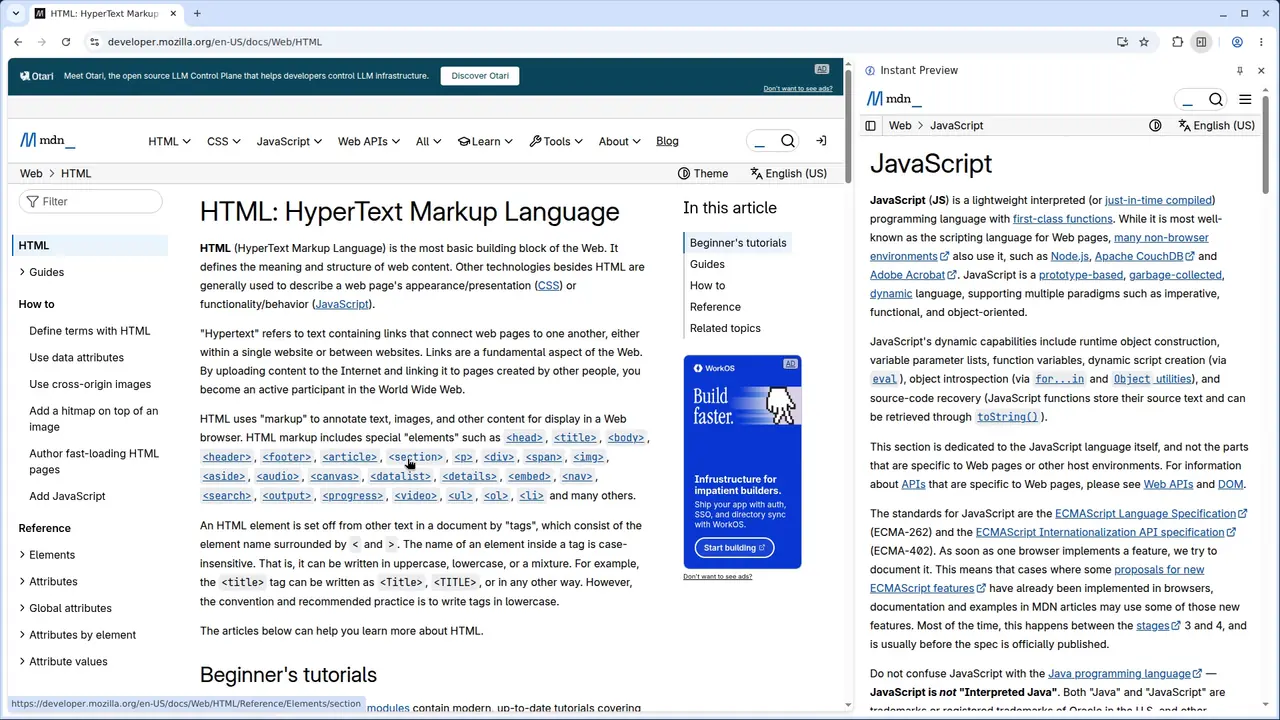
A preview loads the linked page in Chrome’s side panel beside the page you are reading. It is not a safety scan or a static thumbnail.
Open your first preview
You need Chrome 140.0.7289.0 or later and Instant Preview installed. Context Menu Click is the default trigger.
- Right-click an HTTP(S) link and choose Instant Preview.
- Read the destination in the side panel beside your source page.
- Choose Instant Preview on another link to replace the current preview.
Use a preview or a tab?
Use a preview to check a reference while reading or inspect a search destination before committing. Use normal tabs when you want to retain several destinations for later: successive previews replace the panel’s destination.
What a preview does not guarantee
The destination loads and receives a request. Previewing is not a security or privacy barrier, and linked sites can collect data.
Help with your preview
Instant Preview supports HTTP(S) links. The default trigger can be changed in Options. See the Context Menu Click guide for detailed setup, or compare preview triggers to choose a different interaction.